Archives
Categories
Quicksearch
Syndicate This Blog
Linux, Solaris and FreeBSD iostat monitoring with Cacti
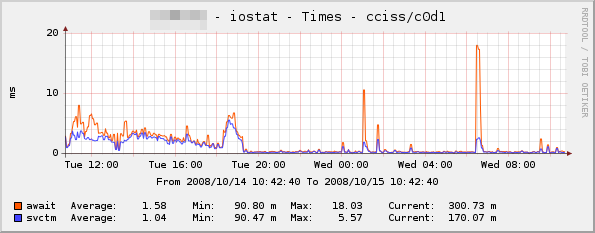
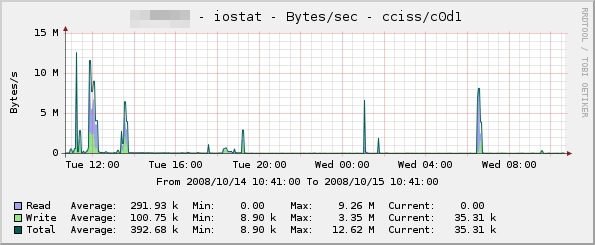
I've been looking for ages for a tool to parse the output from "iostat" on Linux, and graph it in Cacti. I found a few scripts and templates that did some of what I was looking for (disk I/O etc.), but nothing that gave me the full set of statistics such as queue length, utilisation, service time etc. I finally got round to writing my own set of templates and a data gathering script to provide this information, and it seems to work very well. So that others can benefit, I've posted the package archive and a brief description over on the Cacti forums (click Continue Reading for a download link to an updated version - the one on the Cacti forums has a bug so that it won't work with all versions of sysstat). Below are a couple of sample graphs to give you an idea of what it can do - there's also a few more samples posted in the Cacti forums thread :

Installation is a simple matter of creating a cron job to gather iostat data, extending your snmpd.conf to call the included iostat.pl script, and then importing the templates. Full instructions are included in the README within the archive (click the Continue Reading link to see them), but if you have any comments, suggestions or problems please let me know!
Update : Thanks to a patch from Viktor Sokolov, the iostat.pl script should now work with older sysstat versions, including the one that shipped with Debian Etch. I tried to update my original post over on the Cacti forums, but kept getting hit with a wonderful error message ("Mistake! Your message is sent to hell. Try still times who knows - can it will turn out?")
Update 2 : The package now supports Solaris.
Update 3 : The package now supports FreeBSD! The trinity is complete ![]()
In any case, I have uploaded the patched version to this site - you can grab it here : cacti-iostat-1.5.tar.gz
Below is the full text from the included README :
OVERVIEW
--------
This is a collection of scripts and Cacti templates to graph the output from
the "iostat" command. At the moment, it supports Linux and Solaris iostat.
This release was put together by myself (Mark Round), and the iostat.pl script
was based heavily on the fantastic bind9 stats Cacti plugin, written by Cory
Powers. The iostat command used on Linux is "iostat -xkd", which requires a 2.5
or newer kernel. Solaris uses "iostat -dx" which should work on just about any
version of Solaris.
The Solaris modifications were made by Marwan Shaher and Eric Schoeller - many
thanks to you two
The Linux templates have all been exported from Cacti 0.8.7b, and the Solaris
templates were exported from Cacti 0.8.7d. Importing into newer versions of
Cacti should work, but importing into previous versions of Cacti will probably
not work - if you have problems with the templates, please try upgrading first
before reporting a bug.
The OID used by this script (.1.3.6.1.3.1) is marked as being reserved for
"experimental" usage. While it will work out of the box, this range may not be
unique across your organisation. If you decide to change this, you will need to
adjust the instructions below to reflect this.
CHANGES
-------
18/07/2009 - Version 1.5 - Added FreeBSD distribution from Boogie Shafer
22/06/2009 - Version 1.4 - Added FreeBSD license
19/03/2009 - Version 1.3 - Added patch from Marwan Shaher and Eric Schoeller
to support Solaris
16/03/2009 - Version 1.2 - Changed instructions for cron job, so that commas
get substituted with period (.) characters on
older iostat versions
10/03/2009 - Version 1.1 - Added patch from Viktor Sokolov to work with older
sysstat found on Debian Etch and other distros.
14/10/2008 - Version 1.0 - Initial release
FREEBSD NOTES
-------------
Thanks to the awesome work of Boogie Shafer, there is now a FreeBSD port
of these scripts. I have included the modified tarball that was sent to me,
this is inside the archive as the following file :
cacti-iostat-1.x-boogie_freebsd_linux_changes.tar.gz
FreeBSD users should unpack this archive and follow the instructions inside.
I have not had time to go through and merge these changes into one unified
distribution yet, but as people were asking for the FreeBSD port, here it
is!
The next release of these scripts should see the scripts and templates
etc. merged in, much the same as the Solaris modifications by
Marwan Shaher and Eric Schoeller.
INSTALLATION
------------
1.) CRON JOB
On the server to be monitored, copy scripts/iostat.pl to /usr/local/bin.
Then, define a cron job that creates the iostat.cache file. For example, on
most Linux systems, you should be able to create a file called
/etc/cron.d/iostat with the following contents :
root cd /tmp && iostat -xkd 30 2 | sed 's/,/\./g' > io.tmp && mv io.tmp iostat.cache
And on Solaris, you'll need to edit a suitable crontab (root or sys would be the
obvious choices) with the following :
cd /tmp && iostat -dx 30 2 > io.tmp && mv io.tmp iostat.cache
This will create the cache file once every minute, and will sample for 30
seconds. You can adjust this figure as necessary, but avoid the trap of setting
it to sample for 60 seconds - as the command will take slightly longer than 1
minute to run, you'll end up with multiple processes running.
2.) SNMPD MODIFICATION
Edit your NET-SNMPD snmpd.conf file to include the following (adjusting the OID
if necessary, see above) :
pass .1.3.6.1.3.1 /usr/bin/perl /usr/local/bin/iostat.pl
And restart your snmpd process. After the cron job has run (check for the
existence of the /tmp/iostat.cache file), you should be able to test the script
returns data, using a snmpwalk command similar to the following :
snmpwalk -v1 -c community_string your_host_ip .1.3.6.1.3.1.2
You should get a list of devices on the server returned, which will look similar
to the following on Linux :
SNMPv2-SMI::experimental.1.2.1 = STRING: "sda"
SNMPv2-SMI::experimental.1.2.2 = STRING: "dm-1"
SNMPv2-SMI::experimental.1.2.3 = STRING: "sdb"
SNMPv2-SMI::experimental.1.2.4 = STRING: "dm-2"
Or on Solaris :
SNMPv2-SMI::experimental.1.2.1 = STRING: "cmdk0"
SNMPv2-SMI::experimental.1.2.2 = STRING: "cmdk1"
SNMPv2-SMI::experimental.1.2.3 = STRING: "md0"
SNMPv2-SMI::experimental.1.2.4 = STRING: "md1"
If you get no output, go back and double check the previous two steps.
3.) CACTI INSTALLATION
For Linux, copy snmp_queries/linux/iostat.xml to your Cacti server, and place it
under <cacti_path>/resource/snmp_queries. Under Debian, this is
/usr/share/cacti/resource/snmp_queries , but may be different for other systems.
For Solaris, the process is the same, but the file in this archive is
snmp_queries/solaris/solaris-iostat.xml
If you've decided to change the OID, you'll also need to modify these files.
Next, log into your Cacti web interface, and click on "Import Templates". Import
all of the templates under the templates directory for your OS.
You should then be able to go to the host device you want to monitor, and add
the new data queries. Then, click on "Create Graphs for this Host", and
select the devices you want to graph.
FEEDBACK
--------
Any comments, criticism, bug reports, suggestions, fixes, etc. all appreciated!
Drop me a line at cacti@markround.com, and I'll do my best to reply


Thursday, October 23. 2008 at 16:30 (Reply)
Where could I be having my problem?
Monday, October 27. 2008 at 13:35 (Reply)
Also, what happens when you do a SNMP walk for one of the data columns - for instance .1.3.6.1.3.1.13 for the utilisation ?
Monday, October 27. 2008 at 14:16 (Reply)
No, I'm not getting far enough to generate an RRD.
When I add the query to the device ir shows:
1) iostat - Queue size (Verbose Query) Uptime Goes Backwards Success [0 Items, 0 Rows]
I just added the Queue Size one first to see if it worked at all.
A verbose query execution returns:
"+ Running data query [22].
+ Found type = '3' [snmp query].
+ Found data query XML file at '/proj/cacti/cacti-0.8.7b/resource/snmp_queries/iostat.xml'
+ XML file parsed ok.
+ Executing SNMP walk for list of indexes @ '.1.3.6.1.3.1'
+ Located input field 'ioIndex' [walk]
+ Executing SNMP walk for data @ '.1.3.6.1.3.1.1'
+ Located input field 'ioDescr' [walk]
+ Executing SNMP walk for data @ '.1.3.6.1.3.1.2'
+ Found data query XML file at '/proj/cacti/cacti-0.8.7b/resource/snmp_queries/iostat.xml'
"
The snmpwalk you asked for returns valid data:
root@mivl02:/tmp > snmpwalk -v 2c -c CENSOR miux77 .1.3.6.1.3.1.13
SNMPv2-SMI::experimental.1.13.1 = STRING: "0.34"
SNMPv2-SMI::experimental.1.13.2 = STRING: "0.00"
SNMPv2-SMI::experimental.1.13.3 = STRING: "0.00"
SNMPv2-SMI::experimental.1.13.4 = STRING: "0.00"
SNMPv2-SMI::experimental.1.13.5 = STRING: "0.00"
SNMPv2-SMI::experimental.1.13.6 = STRING: "0.00"
SNMPv2-SMI::experimental.1.13.7 = STRING: "0.00"
SNMPv2-SMI::experimental.1.13.8 = STRING: "0.00"
SNMPv2-SMI::experimental.1.13.9 = STRING: "0.00"
SNMPv2-SMI::experimental.1.13.10 = STRING: "0.00"
SNMPv2-SMI::experimental.1.13.11 = STRING: "0.00"
SNMPv2-SMI::experimental.1.13.12 = STRING: "0.00"
SNMPv2-SMI::experimental.1.13.13 = STRING: "0.50"
SNMPv2-SMI::experimental.1.13.14 = STRING: "0.70"
SNMPv2-SMI::experimental.1.13.15 = STRING: "0.00"
SNMPv2-SMI::experimental.1.13.16 = STRING: "0.00"
SNMPv2-SMI::experimental.1.13.17 = STRING: "0.00"
SNMPv2-SMI::experimental.1.13.18 = STRING: "0.00"
SNMPv2-SMI::experimental.1.13.19 = STRING: "0.00"
SNMPv2-SMI::experimental.1.13.20 = STRING: "0.00"
SNMPv2-SMI::experimental.1.13.21 = STRING: "0.00"
SNMPv2-SMI::experimental.1.13.22 = STRING: "0.00"
SNMPv2-SMI::experimental.1.13.23 = STRING: "0.00"
Monday, October 27. 2008 at 14:44 (Reply)
The verbose query (and the "Success [0 Items, 0 Rows]" bit) makes it appear as though no valid data is coming back.
You should have a list of indexes and descriptions in the verbose query, e.g.
+ Executing SNMP walk for data @ '.1.3.6.1.3.1.1'
+ Found item [ioIndex='1'] index: 1 [from value]
+ Found item [ioIndex='2'] index: 2 [from value]
+ Found item [ioIndex='3'] index: 3 [from value]
+ Found item [ioIndex='4'] index: 4 [from value]
+ Found item [ioIndex='5'] index: 5 [from value]
+ Found item [ioIndex='6'] index: 6 [from value]
+ Found item [ioIndex='7'] index: 7 [from value]
+ Found item [ioIndex='8'] index: 8 [from value]
...
... and so on...
...
But you say a SNMP walk provides valid data ? Are there perhaps any strange characters in your device names ? How many devices are there that you're trying to poll ?
Monday, October 27. 2008 at 16:34 (Reply)
Monday, October 27. 2008 at 16:44 (Reply)
Your scripts won't work well on a enterprise class host with many redundant path's, et al.
It works just fine returning results on smaller hosts.
How could you modify this script to return only valid paths and exclude disks with no valid partition tables?
IE: fdisk on dm-176 may return
Disk /dev/dm-176 doesn't contain a valid partition table
Monday, October 27. 2008 at 21:02 (Reply)
Typically, my hosts only have around 10-20 multipathed devices from the SAN.
I'll put some test cases together with this (and play with different partition table types etc.), and see what I can come up with. Thanks again for the comments!
Tuesday, December 16. 2008 at 03:04 (Reply)
+ Running data query [10].
+ Found type = '3' [snmp query].
+ Found data query XML file at '/var/www/cacti/resource/snmp_queries/iostat.xml'
+ XML file parsed ok.
+ Executing SNMP walk for list of indexes @ '.1.3.6.1.3.1'
+ No SNMP data returned
+ Found data query XML file at '/var/www/cacti/resource/snmp_queries/iostat.xml'
Any hints?
Thursday, March 12. 2009 at 14:22 (Reply)
I have attempted to set up iostat graphing with little luck. I am very sure it has to do with indexed data source.
Basically, I have the cron, snmp and iostat.pl script working. I also have a working cacti. From the cacti log, it does poll successfully.
Problem lies on this field Index Value on the data source. Using the existing OID, what is supposed to go in this field?
Thanks for hep in advance
Regards
Monday, March 16. 2009 at 14:43 (Link) (Reply)
Monday, March 16. 2009 at 20:01 (Reply)
Hey, think the script is formatting the data correctly as you can see below. I wonder however if you can point me further on what I am not doing correctly. Here is a snmpwalk output
SNMPv2-SMI::experimental.1.1.1 = INTEGER: 1
SNMPv2-SMI::experimental.1.2.1 = STRING: "xvda"
SNMPv2-SMI::experimental.1.3.1 = STRING: "0.00"
SNMPv2-SMI::experimental.1.4.1 = STRING: "2.07"
SNMPv2-SMI::experimental.1.5.1 = STRING: "0.00"
SNMPv2-SMI::experimental.1.6.1 = STRING: "0.83"
I have imported all the 7 templates successfully, created a host and added associated data queries related to the iostat.
However, it I attempt to click on create host on the device page, I get an error
"Data Query [iostat - kBytes/sec]"
"Error in data query."
I have also attempted to create the graphs manually. I then have to provide Index Value, a field that have no idea what is expected on it. After typing in the first OID, I gut an error and therefore this message.
Would you mind assisting please, a pointer for example of what Index value is expected for example would be enough
Wednesday, April 1. 2009 at 11:28 (Reply)
I am getting the following error when I try to import the templates
Error: XML: Hash version does not exist.
Can you please assist
Regards,
Eric
Wednesday, April 1. 2009 at 11:42 (Reply)
Wednesday, April 1. 2009 at 11:57 (Reply)
Wednesday, April 1. 2009 at 12:14 (Reply)
Friday, June 12. 2009 at 23:26 (Reply)
Hi Mark,
Having some issues here, none of the graphs are generating any data.
snmpwalk -v1 -c public 127.0.0.1 .1.3.6.1.3.1.13
SNMPv2-SMI::experimental.1.13.1 = STRING: "0.00"
SNMPv2-SMI::experimental.1.13.2 = STRING: "0.00"
SNMPv2-SMI::experimental.1.13.3 = STRING: "0.00"
SNMPv2-SMI::experimental.1.13.4 = STRING: "0.00"
SNMPv2-SMI::experimental.1.13.5 = STRING: "0.00"
SNMPv2-SMI::experimental.1.13.6 = STRING: "0.00"
SNMPv2-SMI::experimental.1.13.7 = STRING: "0.00"
SNMPv2-SMI::experimental.1.13.8 = STRING: "0.00"
SNMPv2-SMI::experimental.1.13.9 = STRING: "0.00"
SNMPv2-SMI::experimental.1.13.10 = STRING: "0.00"
SNMPv2-SMI::experimental.1.13.11 = STRING: "0.00"
SNMPv2-SMI::experimental.1.13.12 = STRING: "0.00"
An iostat provides the following
Device: tps Blk_read/s Blk_wrtn/s Blk_read Blk_wrtn
sda 1.16 2.24 42.31 186060 3510968
sda1 0.00 0.00 0.00 378 200
sda2 0.00 0.00 0.00 400 0
sda3 1.16 2.22 42.31 184306 3510768
sdb 2.48 14.32 46.61 1188238 3867120
sdb1 1.12 2.06 25.51 171034 2116624
sdb2 0.82 7.16 12.85 593746 1066048
sdb3 0.54 5.09 8.25 422322 684448
sdc 0.03 0.88 0.30 73346 24816
sdc1 0.03 0.88 0.30 73042 24816
sdd 0.13 0.56 0.98 46698 81664
sdd1 0.13 0.56 0.98 46322 81664
Running query in debug mode on cacti returns
+ Running data query [15].
+ Found type = '3' [snmp query].
+ Found data query XML file at '/var/www/html/cacti/resource/snmp_queries/iostat.xml'
+ XML file parsed ok.
+ Executing SNMP walk for list of indexes @ '.1.3.6.1.3.1'
+ No SNMP data returned
+ Found data query XML file at '/var/www/html/cacti/resource/snmp_queries/iostat.xml'
Any ideas, thanks.
Monday, June 15. 2009 at 09:48 (Reply)
Monday, June 15. 2009 at 16:43 (Reply)
SELinux is not enabled. Here is the output in the iostat.cache file. Thanks.
Linux 2.4.21-47.0.1.ELcustom_oct_27_2006 (xtropicalis) 06/15/09
Device: rrqm/s wrqm/s r/s w/s rsec/s wsec/s rkB/s wkB/s avgrq-sz avgqu-sz await svctm %util
sda 0.03 3.17 0.11 0.82 1.09 32.09 0.54 16.05 35.68 0.00 1.26 0.80 0.07
sda1 0.00 0.00 0.00 0.00 0.01 0.00 0.00 0.00 13.90 0.00 7.82 5.13 0.00
sda2 0.00 0.00 0.00 0.00 0.00 0.00 0.00 0.00 12.31 0.00 4.10 4.10 0.00
sda3 0.03 3.17 0.10 0.82 1.08 32.09 0.54 16.05 35.72 0.00 1.25 0.80 0.07
sdb 0.69 3.52 0.52 1.59 8.33 40.87 4.16 20.44 23.28 0.01 2.99 1.38 0.29
sdb1 0.13 2.09 0.05 1.08 1.10 25.31 0.55 12.65 23.54 0.00 1.12 0.54 0.06
sdb2 0.29 1.17 0.24 0.34 4.08 12.10 2.04 6.05 27.79 0.00 4.17 2.32 0.14
sdb3 0.27 0.26 0.23 0.18 3.14 3.47 1.57 1.73 16.15 0.00 6.44 2.83 0.12
sdc 0.11 0.01 0.00 0.03 0.56 0.31 0.28 0.15 27.08 0.00 3.18 1.73 0.01
sdc1 0.11 0.01 0.00 0.03 0.56 0.31 0.28 0.15 27.21 0.00 3.19 1.73 0.01
sdd 0.02 0.06 0.04 0.04 0.33 0.57 0.16 0.29 11.97 0.01 89.02 1.91 0.01
sdd1 0.02 0.06 0.04 0.04 0.33 0.57 0.16 0.29 11.97 0.01 89.27 1.92 0.01
Device: rrqm/s wrqm/s r/s w/s rsec/s wsec/s rkB/s wkB/s avgrq-sz avgqu-sz await svctm %util
sda 0.00 3.17 0.00 0.70 0.00 30.93 0.00 15.47 44.19 0.00 0.00 0.00 0.00
sda1 0.00 0.00 0.00 0.00 0.00 0.00 0.00 0.00 0.00 0.00 0.00 0.00 0.00
sda2 0.00 0.00 0.00 0.00 0.00 0.00 0.00 0.00 0.00 0.00 0.00 0.00 0.00
sda3 0.00 3.17 0.00 0.70 0.00 30.93 0.00 15.47 44.19 0.00 0.00 0.00 0.00
sdb 0.00 2.87 0.00 1.07 0.00 31.47 0.00 15.73 29.50 0.00 0.00 0.00 0.00
sdb1 0.00 1.80 0.00 0.73 0.00 20.27 0.00 10.13 27.64 0.00 0.00 0.00 0.00
sdb2 0.00 1.00 0.00 0.20 0.00 9.60 0.00 4.80 48.00 0.00 0.00 0.00 0.00
sdb3 0.00 0.07 0.00 0.13 0.00 1.60 0.00 0.80 12.00 0.00 0.00 0.00 0.00
sdc 0.00 0.00 0.00 0.00 0.00 0.00 0.00 0.00 0.00 0.00 0.00 0.00 0.00
sdc1 0.00 0.00 0.00 0.00 0.00 0.00 0.00 0.00 0.00 0.00 0.00 0.00 0.00
sdd 0.00 0.00 0.00 0.00 0.00 0.00 0.00 0.00 0.00 0.00 0.00 0.00 0.00
sdd1 0.00 0.00 0.00 0.00 0.00 0.00 0.00 0.00 0.00 0.00 0.00 0.00 0.00
Tuesday, June 16. 2009 at 09:04 (Reply)
From the README :
"The iostat command used on Linux is "iostat -xkd", which requires a 2.5 or newer kernel."
Although, it might work on a patched 2.4 series system. It looks like you have a couple of extra columns in your output - you have :
Device
rrqm/s
wrqm/s
r/s
w/s
rsec/s
wsec/s
rkB/s
wkB/s
avgrq-sz
avgqu-sz
await
svctm
%util
Whereas I have :
Device
rrqm/s
wrqm/s
r/s
w/s
rkB/s
wkB/s
avgrq-sz
avgqu-sz
await
svctm
%util
So, assuming your statistics are getting reported correctly, you could always try modifying the regex inside the perl script to include those columns (add a couple more \s+(\d+\.\d+) blocks, so it might read :
/^([a-z0-9\-\/]+)\s+(\d+\.\d+)\s+(\d+\.\d+)\s+(\d+\.\d+)\s+(\d+\.\d+)\s+(\d+\.\d+)\s+(\d+\.\d+)\s+(\d+\.\d+)\s+(\d+\.\d+)\s+(\d+\.\d+)\s+(\d+\.\d+)\s+(\d+\.\d+)\s+(\d+\.\d+)\s+(\d+\.\d+)/;
Hrm. I really should optimise that into using repeating groups!
And then altering the $stats assignment below it, so that rkB/s and everything else past it gets bumped up two places - e.g.
$stats{"$base_oid.7.$devices"} = $8; # rkB/s
$stats{"$base_oid.8.$devices"} = $9; # wkB/s
$stats{"$base_oid.9.$devices"} = $10; # avgrq-sz
$stats{"$base_oid.10.$devices"} = $11; # avgqu-sz
$stats{"$base_oid.11.$devices"} = $12; # await
$stats{"$base_oid.12.$devices"} = $13; # svctm
$stats{"$base_oid.13.$devices"} = $14; # %util
Does that help ?
Tuesday, June 16. 2009 at 17:09 (Reply)
Thanks for the help. I tried to add the regex and stats for the additional columns but the queries still report no SNMP Data reported. The iostat command does seem to be returning valid results.
Any other hints as to why its not working.
Thanks very much.
Sunday, June 21. 2009 at 18:26 (Reply)
I have a question though : Cacti is basically probing every 5 minutes and your "iostat.pl" script runs every minute, why not running it every five minutes to have a more "average" value?
Regards,
Tuesday, June 23. 2009 at 14:45 (Reply)
But yes, you are right, you could easily modify it to run every 5 minutes, and sample data for, say, 285 seconds to allow for 15 seconds gap before the next process kicks off.
Tuesday, June 23. 2009 at 14:35 (Reply)
I like the script alot. However, all the graphs that contain read info. Display read as 0.
Any updates on that ?
Thanks
Friday, July 10. 2009 at 03:32 (Reply)
+ Running data query [10].
+ Found type = '3' [snmp query].
+ Found data query XML file at '/opt/csw/apache2/share/htdocs/cacti-0.8.7d/resource/snmp_queries/iostat-solaris.xml'
+ XML file parsed ok.
+ Executing SNMP walk for list of indexes @ '.1.3.6.1.3.1'
+ No SNMP data returned
+ Found data query XML file at '/opt/csw/apache2/share/htdocs/cacti-0.8.7d/resource/snmp_queries/iostat-solaris.xml'
+ Found data query XML file at '/opt/csw/apache2/share/htdocs/cacti-0.8.7d/resource/snmp_queries/iostat-solaris.xml
while from the caci host, on the command line,
bash-3.00# /usr/sfw/bin/snmpwalk -v2c -c public krakon.central.sun.com .1.3.6.1.3.1
SNMPv2-SMI::experimental.1.1.1 = INTEGER: 1
SNMPv2-SMI::experimental.1.1.2 = INTEGER: 2
...
...
(ending after a while with a)
SNMPv2-SMI::experimental.1.11.8 = STRING: "0"
SNMPv2-SMI::experimental.1.11.9 = STRING: "0"
SNMPv2-SMI::experimental.1.11.10 = STRING: "0"
Timeout: No Response from krakon.central.sun.com
I'm assuming that the ending with a timeout is OK.
any tips on where to take troubleshooting next?
Friday, July 10. 2009 at 14:04 (Reply)
What about if you use SNMP v1 ?
Friday, July 10. 2009 at 16:47 (Reply)
bash-3.00# /usr/sfw/bin/snmpwalk -v2c -c public krakon.central.sun.com .1.3.6.1.3.1
it comes back quickly, with a LARGE amount of data... (the elipses ... ... is the excluded content, up to my comment of ending after a while and the last few lines).
The test you have requested returns (quickly)
bash-3.00# /usr/sfw/bin/snmpwalk -v2c -c public krakon.central.sun.com .1.3.6.1.3.1.2
SNMPv2-SMI::experimental.1.2.1 = STRING: "sd0"
SNMPv2-SMI::experimental.1.2.2 = STRING: "sd3"
SNMPv2-SMI::experimental.1.2.3 = STRING: "nfs1"
SNMPv2-SMI::experimental.1.2.4 = STRING: "nfs2"
SNMPv2-SMI::experimental.1.2.5 = STRING: "nfs3"
SNMPv2-SMI::experimental.1.2.6 = STRING: "nfs8"
SNMPv2-SMI::experimental.1.2.7 = STRING: "nfs12"
SNMPv2-SMI::experimental.1.2.8 = STRING: "nfs13"
SNMPv2-SMI::experimental.1.2.9 = STRING: "nfs27"
SNMPv2-SMI::experimental.1.2.10 = STRING: "nfs28"
I'm concerned about the pass line of using the perl command line via the snmpd.conf. Can you go into the requirements you have "met" in your perl install to support this?
This line from the snmpd.conf
pass .1.3.6.1.3.1 /opt/csw/bin/perl /opt/bots/bin/iostat.pl
at the same time, attempting to the host from cacti
+ Running data query [10].
+ Found type = '3' [snmp query].
+ Found data query XML file at '/opt/csw/apache2/share/htdocs/cacti-0.8.7d/resource/snmp_queries/iostat-solaris.xml'
+ XML file parsed ok.
+ Executing SNMP walk for list of indexes @ '.1.3.6.1.3.1'
+ No SNMP data returned
+ Found data query XML file at '/opt/csw/apache2/share/htdocs/cacti-0.8.7d/resource/snmp_queries/iostat-solaris.xml'
Friday, July 10. 2009 at 16:53 (Reply)
Friday, July 17. 2009 at 03:45 (Reply)
Thursday, July 30. 2009 at 11:40 (Reply)
Solved the problem by commenting out the "dlmod seaProxy" and "dlmod seaExtensions" in snmpd.conf.
The problem was that these did not load due some errors, and it did not seem to affect anything except this. So check you snmpd.log for errors and and fix them if you have any. Hope it helps.
Tuesday, August 11. 2009 at 04:49 (Reply)
Tuesday, August 11. 2009 at 06:03 (Reply)
Monday, August 3. 2009 at 11:33 (Reply)
I'm not sure but I think there are still some errors in iostat.xml:
ioDescr:ioName:ioIndex should be ioDescr:ioIndex because there is no ioName
and should be .1.3.6.1.3.1.1
Wednesday, August 26. 2009 at 21:25 (Link) (Reply)
# iostat.pl
SO : linux
Fetching oid :
My iostat.cache was correctly generated... I'm using RHEL 5.3... any ideas? :/
Monday, September 21. 2009 at 16:07 (Link) (Reply)
Thursday, October 8. 2009 at 12:39 (Reply)
iostat - Bytes/sec
iostat - Queue size
iostat - Request size
iostat - Requests/sec
iostat - Times
iostat - Utilisation
Thursday, October 8. 2009 at 15:33 (Reply)
The output differs depending on a huge number of factors such as the spec of the system, what kind of drive or RAID array is being graphed, what the load is, what the interconnect is...
As a rough rule of thumb though, you're probably wanting to check the requests/s - once the IOPS start to go beyond what your drive or array can provide, then you'll see the service and wait times increase, and therefore the queue size. This is bad - but again, there's no definitive answer.
What's considered "bad" latency for one user with a honking great FC array may be totally acceptable for another user with a single SATA drive.
Friday, October 23. 2009 at 12:48 (Reply)
snmpwalk -v2c -c mistral localhost .1.3.6.1.3.1
SNMPv2-SMI::experimental.1 = No Such Instance currently exists at this OID
all the servers are RHEL 5.4 64bit, NET-SNMP version: 5.3.2.2
I know you say the OID is experimental but i don't understand about changing it
Friday, October 30. 2009 at 17:52 (Reply)
It would be great if this would graph iowait percentages as well. I suppose I could add this functionality myself, but hey, it's your script
Monday, November 16. 2009 at 20:42 (Link) (Reply)
Tuesday, November 17. 2009 at 18:09 (Reply)
There are other cacti templates that provide this information - one of the CPU utilisation graphs definitely does. Can't remember off-hand which one, though as I'm not logged into work right now.
The problem is that on modern multi-core, multi-cpu systems, iowait has become largely meaningless. Sun even removed it from the output of vmstat starting in Solaris 10; it now just returns 0s.
You're probably far better off using the output from vmstat and iostat to identify if you have an IO bottleneck...
-Mark
Saturday, November 7. 2009 at 10:43 (Reply)
you cant use pass in the net-snmp config file when using net-snmp 5.4
Regards
Jocke W
Tuesday, November 17. 2009 at 14:48 (Link) (Reply)
I was just searching for ways to graph disk utilisation in Cacti today and saw your name in the Google results. Interestingly, your blog only came up when I spelled "utilisation" correctly.
This is brilliant work and it worked flawlessly in the setup we have here. (Cacti is installed under /usr/share/cacti/ on CentOS too.)
Thanks for sharing your work,
Dave.
Tuesday, November 17. 2009 at 18:12 (Reply)
Good to hear from you again - I'll be dropping you a line over Facebook or Email soon
Wednesday, November 18. 2009 at 15:21 (Reply)
when do you prognoses FreeBSD patch will be available for download ?
It is important question for me now, and your`s script seems to be best one among what i saw.
Wednesday, November 18. 2009 at 19:07 (Reply)
I haven't had a chance to merge them cleanly into the main distribution, but hope this helps!
Thursday, November 19. 2009 at 17:16 (Reply)
Got a problem mentioned here several times:
+ XML file parsed ok.
+ Executing SNMP walk for list of indexes @ '.1.3.6.1.3.1'
+ No SNMP data returned
does anybody now have a clue ? or any ideas how to figure out this ?
I`m stuck...
Wednesday, January 6. 2010 at 14:56 (Reply)
Monday, January 11. 2010 at 17:56 (Reply)
+ No SNMP data returned
Monday, January 11. 2010 at 20:36 (Reply)
+ No SNMP data returned
when adding data querys, i had to set the snmp timeout from 400ms to 10000ms. my host was returning snmpwalk data but very slowly. once i set it to a timeout of 10,000ms cacti can now get the data and add the query!
Saturday, January 16. 2010 at 09:19 (Reply)
Thanks a lot
Saturday, February 13. 2010 at 00:01 (Reply)
I'm running latest cacti 0.8.7a and I can't import any of the templates. Ideas?
Wednesday, March 10. 2010 at 16:05 (Link) (Reply)
These templates were exported from 0.8.7b (or later depending on which OS you are using).
The current version is 0.8.7e. Try upgrading.
Wednesday, March 10. 2010 at 16:14 (Link) (Reply)
http://code.google.com/p/mysql-cacti-templates/
They have some similar IOStat graphs to these ones along with graphs for Apache, Memcached, Nginx and a set of absolutely brilliant MySQL graphs.