

Returning To Rails in 2026
Updated:
Discussion on Hacker News Discussion on lobste.rs

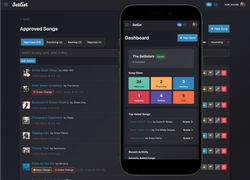
So when my covers band started having trouble keeping track of our setlists and song notes (“How many times do we repeat the ending?”, “Why did we reject this song again?”…) I decided to build an app. We’d tried various approaches from spreadsheets to chat groups, and nothing seemed to work or provide a frictionless way of capturing notes and planning gigs in a consistent way.
The Unapologetic Rubyist
I know, right? Rails. That old thing ? People still use that ? But as I was doing this purely for fun, I decided to forgo the usual stacks-du-jour at $DAYJOB, and go back to my “first love” of Ruby. I also figured it would be a great opportunity to get re-acquainted with the framework that shook things up so much in the early 2000s. I’d been keeping half an eye on it over the years but it’s been a long time since I’ve done anything serious with Rails. The last time I properly sat down with it was probably around the Rails 3-4 era about 13-14 years ago now. Life moved on, I got deep into infrastructure and DevOps work, and Rails faded into the background of my tech stack.
The 2025 Stack Overflow Developer Survey paints a similar picture across the wider developer world as a whole, too. Rails seems to have pretty much fallen out of favour, coming in at #20 underneath the bulk of top-10 JavaScript and ASP.NET frameworks:

And Ruby itself is nowhere near the top 10 languages, sitting just underneath Lua and freaking Assembly language in terms of popularity! I mean, I love me some good ol’ z80 or 68k asm, but come on… For comparison, Javascript is at 66% and Python is at 57.9%.

But I’m a stubborn bastard, and if I find a technology I like, I’ll stick with it particularly for projects where I don’t have to care about what anyone else is using or what the latest trend is. So Ruby never really left me. I’ve always loved it, and given the choice, it’s the first tool I reach for to build something.
yield, and how even complex logic reads almost like English. There’s just this minimal translation required between what I’m thinking and what I type. Sure, I can knock things together in Python, Go, or whatever the flavour of the month is, but I always feel on some level like I’m fighting the language rather than working with it. And of course there was the welcoming, quirky “outsider” community feel with characters like Why the Lucky Stiff and their legendary Poignant Guide To Ruby.
The Engine Room
I should point out that my interest (and focus of this blog post) has always been firmly in the “engine room” side of development - the sysadmin, DevOps, back-end infrastructure world. Probably for much the same reason I’ve gravitated towards the bass guitar as my musical instrument of choice. Now, I’m conversant in front-end technologies, having been a “webmaster” since the late 90s when we were all slicing up images in Fireworks, wrestling with table-based layouts and running random stuff from Matt’s Script Archive for our interactive needs.
But the modern world of front-end development - JavaScript frameworks, the build tooling, the CSS hacks - it’s never really captured my imagination in the same way. I can bluff my way in it to a certain extent, and I appreciate it on the level I do with, say, a lot of Jazz: It’s technically impressive and I’m in awe of what a skilled developer can do with it, but it’s just not for me. It’s a necessity, not something I’d do for fun.
Rails 8: A Familiar Stranger
While I haven’t built or managed a full Rails codebase in years, I’d never completely left the Rails ecosystem. There’s bits and pieces that are just so useful even if you’re just quickly chucking a quick API together with Sinatra. ActiveSupport for example has been a constant companion in various Ruby projects over the years - it’s just so nice being able to write things like
unless date <= 3.days.from_now
or
if upload_size > 2.megabytes
But sitting down with Rails 8 proper was something else. It’s recognisable, certainly - the MVC structure, the conventions, the generators are all where you’d expect them. Someone with my dusty Rails 3 experience can still find their way around and quickly throw up the basic scaffolding. But under the hood and around the edges, it’s become a very different beast.
Frontend

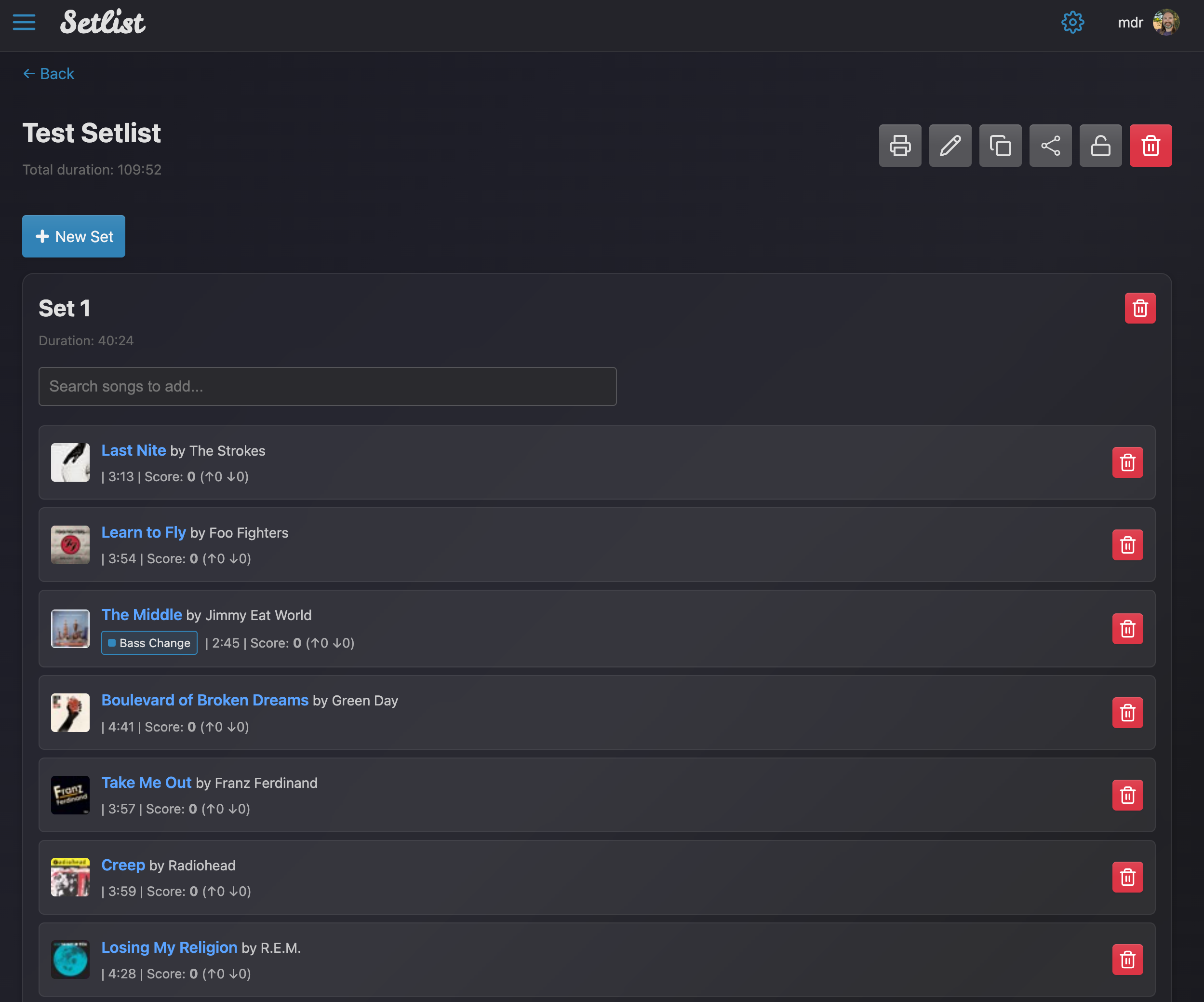
Turbo handles things like intercepting link clicks and form submissions, then swapping out the <body> or targeted fragments of the page to give a Single Page App-like snappiness without actually building a SPA. I could then sprinkle in small Stimulus JS controllers to add specific behaviour where needed, like pop-up modals and more dynamic elements. It was pretty impressive how quickly I could build something that felt like a modern application while still using my familiar standard ERB templates and server-side rendered content.
Stimulus and “No-Build”
While Stimulus seems to have a smaller developer community than the big JS toolkits/frameworks, there are plenty of great, carefully-written and designed component libraries you can easily drop into your project. For example check out the Stimulus Library and Stimulus Components projects which include some great components that you can tweak or use directly.
This was my first introduction to the vastly simplified JS library bundling tool that seems to have been introduced around the Rails 7 timeframe. Instead of needing a JS runtime, NPM tooling and separate JS bundling/compliation steps (Webpack - again, urgh….), JS components are now managed with the simple importmap command and tooling. So, to make use of one of those components like the modal Dialog pop-up for example, you just run:
$ bin/importmap pin @stimulus-components/dialog
This downloads the package from a JS CDN and adds it to your vendor directory and updates your config/importmap.rb. The package then gets automatically included in your application with the javascript_importmap_tags ERB tag included in the <head> of the default HTML templates. You can see how this gets expanded if you look at the source of any generated page in your browser:
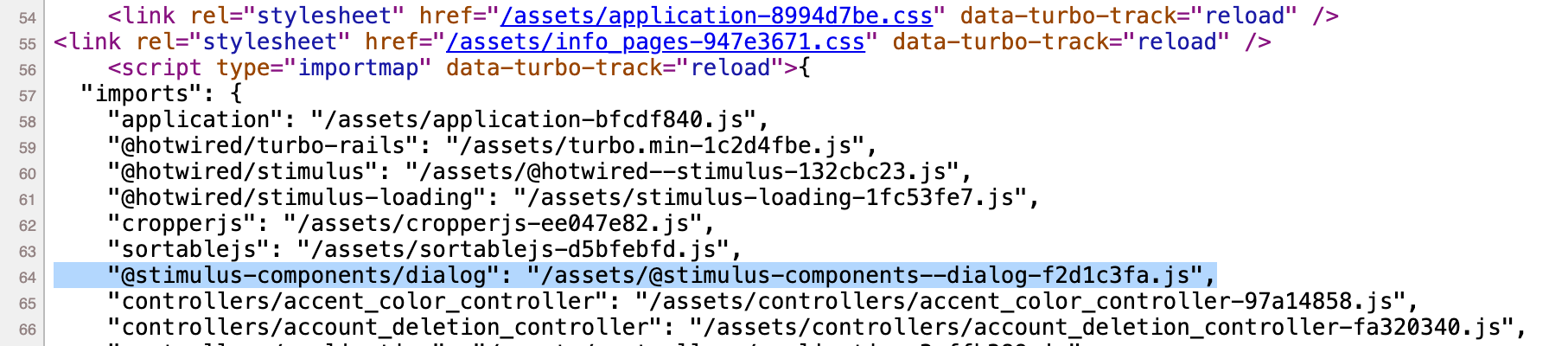
You can then register the controller as per the docs (a few lines in javascript/controllers/index.js which can be skipped for locally-developed controllers as they’re handled by the autoloader) and get using it right away in your view templates. As the docs say: “This frees you from needing Webpack, Yarn, npm, or any other part of the JavaScript toolchain. All you need is the asset pipeline that’s already included in Rails.”
 I can’t express how grateful I am for this change. I’m also annoyed with myself for missing out that this was added back in Rails 7. Had I noticed, I probably would have taken it out for a spin far sooner! I have to confess though that beyond the basics, I have somewhat lacking front-end skills (and was quickly developing The Flexbox Rage), so I took bits from various templates & online component generators, and got Claude to generate the rest with some mockups of common screens and components. I then sliced & diced, copied & pasted my way to a usable UI using a sort of customized “UI toolkit” - Rails partials are great for these sorts of re-usable elements.
I have mixed feelings about this. On the one hand, it helped me skip over the frustrating parts of frontend development that I don’t particularly enjoy, so I could focus on the fun backend stuff. It also did produce an objectively better experience far quicker than anything I’d have been able to come up with purely by myself. On the other… I view most AI-generated content such as music, art & poetry (not to mention the typical LinkedIn slop which triggers a visceral reaction in me) to be deeply objectionable. My writing and artistic content on this site is 100% AI-free for that very reason; To my Gen-Xer mind, these are the things that really define what it means to be human and I find it distasteful and unsettling in the extreme to have these expressions created by an algorithm. And yet - for me, coding is a creative endeavour and some of it can definitely be considered art. Am I a hypocrite to use UI components created with help from an AI ? What (if any) is the difference between that and copying from some Bootstrap template or modifying components from a UI library ? I’m going to have to wrestle with this some more, I think.
Workflow
A slight detour here to explain my workflow and hopefully illustrate why I love Rails so much in the first place. It really shook things up in the early 2000s - before that, most of the web frameworks I’d used (I’m looking at you, Struts…) were massively complex and required endless amounts of XML boilerplate and other configuration to wire things up. Rails threw all that away and introduced the notion of “convention over configuration” and took full advantage of the expressive, succinct coding style enabled by Ruby.
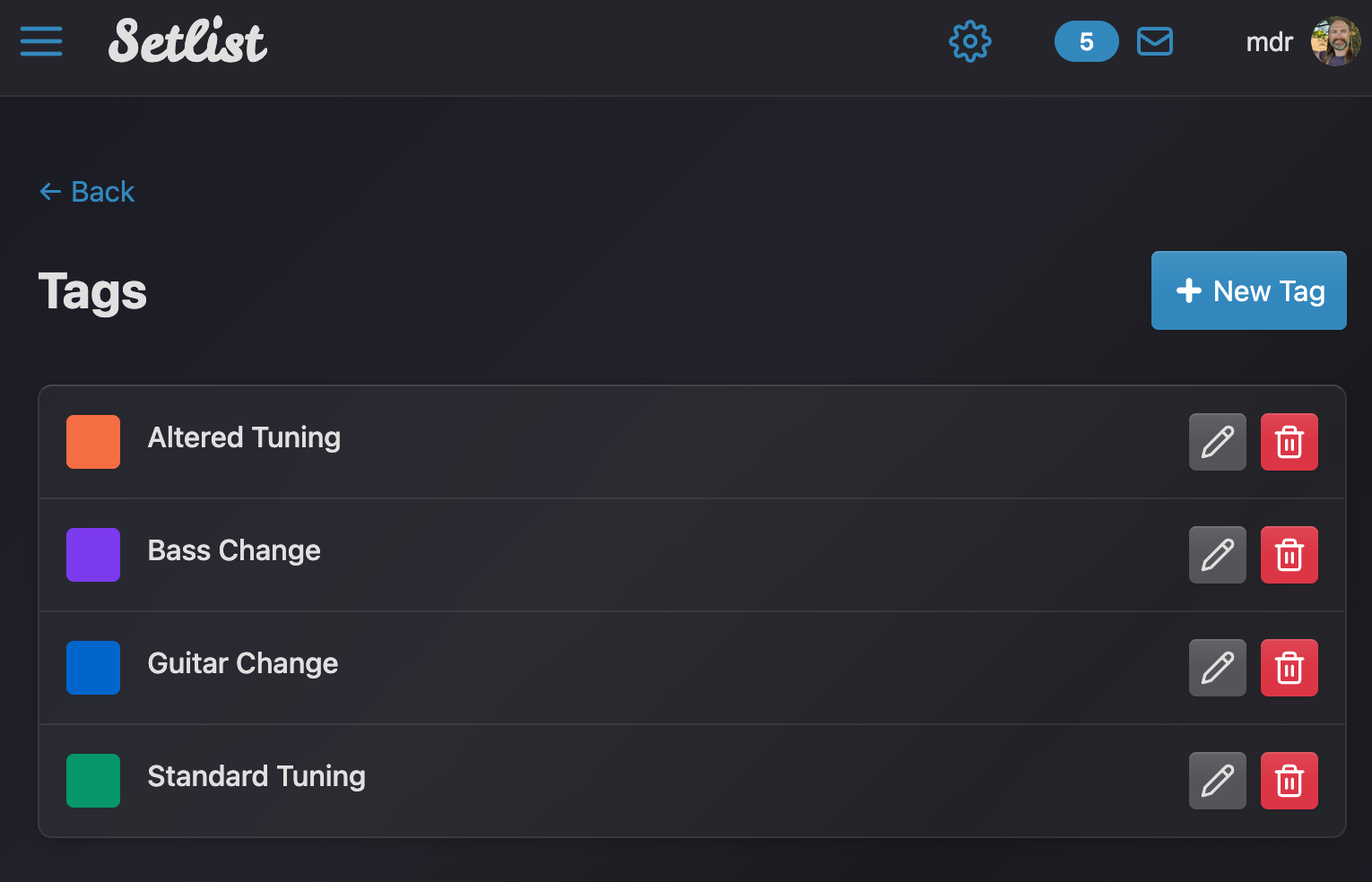
$ bin/rails generate model Tag label:string color:string band:belongs_to
This resulted in a app/models/tag.rb like this:
class Tag < ApplicationRecord
  belongs_to :band
end
This automagically fetches the column names and definitions from the database, no other work required! Of course, we usually want to set some validation. There’s all kinds of hooks and additions you can sprinkle here, so if I wanted to validate that for example a valid Hex colour has been set, I could add:
validates :color,
  presence: true,
  format: { with: /\A#[0-9a-fA-F]{6}\z/, message: "must be valid hex" }
Then I set up URL routing. While you can later get very specific about which routes to create, a simple starting point is just this one line in config/routes.rb
resources :tags
Which generated the standard RESTful routes automatically:
$ rails routes -c TagsController
          Prefix Verb   URI Pattern                             Controller#Action
       band_tags GET    /bands/:band_id/tags(.:format)          tags#index
                 POST   /bands/:band_id/tags(.:format)          tags#create
    new_band_tag GET    /bands/:band_id/tags/new(.:format)      tags#new
   edit_band_tag GET    /bands/:band_id/tags/:id/edit(.:format) tags#edit
        band_tag GET    /bands/:band_id/tags/:id(.:format)      tags#show
                 PATCH  /bands/:band_id/tags/:id(.:format)      tags#update
                 PUT    /bands/:band_id/tags/:id(.:format)      tags#update
                 DELETE /bands/:band_id/tags/:id(.:format)      tags#destroy
Note all the .format stuff - this lets you respond to different “extensions” with different content type. So in this case, requesting /bands/1/tags/5 would return HTML by default, but I could also request /bands/1/tags/5.json and the controller can be informed that I’m expecting a JSON response.
I tend to use this to quickly flesh out the logic of an application without worrying about the presentation until later. For example, in the Tags controller I started with something like this to fetch a record from the DB and return it as JSON:
class TagsController < ApplicationController
  # Auth and other stuff skipped for brevity...

  def show
    @tag = @band.tags.find(params[:id])
    respond_to do |format|
      format.html # Use ERB template show.html.erb when I implement it
      format.json { render json: @tag }
    end
  end
end
And then I could test my application and logic using the RESTful routes using just plain old curl from my terminal:
$ curl --silent -XGET \
  -H "Authorization: Bearer <token>" http://localhost:3000/bands/4/tags/5.json | jq .
{
  "id": 5,
  "band_id": 4,
  "label": "Bass Change",
  "color": "#3288bd",
  "created_at": "2026-01-15T04:42:24.443Z",
  "updated_at": "2026-01-15T04:42:24.443Z"
}
Once that was all working, I moved on to generating the views as standard ERB templates. Combined with live-reloading and other developer niceities, I could go from idea to working proof-of-concept in a stupidly short amount of time. Plus, there seems to be a gem for just about anything you might want to build or integrate with. Want to import a CSV list of songs ? CSV.parse has you covered. How about generating PDFs for print copies of setlists ?
pdf = Prawn::Document.new do
  text "I <b>LOVE</b> Ruby", inline_format: true
end
print pdf.render
And so on. Have I mentioned I love Ruby?
Solid Backend Improvements
I’ve always liked the way Rails lets you enable components and patterns as you scale. You can start small on just SQLite, move to a dedicated database server when traffic demands it, then layer in caching, background jobs and the rest as the need arises.
But the problem there is all the additional infrastructure you need to stand up to support these things. Want caching? Stand up Redis or a Memcache. Need a job queue or scheduled tasks? Redis again. And then there’s the Ruby libraries like Resque or Sidekiq to interact with all that… Working at GitLab, I certainly appreciated Sidekiq for what it does, but for the odd async task in a small app it’s overkill.
Caching
This is where the new Solid* libraries (Solid Cache, Solid Queue and Solid Cable) included in Rails 8 really shine. Solid Cache uses a database instead of an in-memory store, the thinking being that modern storage is plenty fast enough for caching purposes. This means you can cache a lot more than you would do with a memory-based store (pretty handy these days in the middle of a RAM shortage!), but you also don’t need another layer such as Redis.
Everything is already setup to make use of this, all you need to do is start using it using standard Rails caching patterns. For example, I make extensive use of fragment caching in ERB templates where entire rendered blocks of HTML are stored in the cache. This can be something simple like caching for a specific time period:
<% cache "time_based", expires_in: 5.minutes do %>
  <!-- content goes here -->
<% end %>
Or based on a model, so when the model gets updated the cache will be re-generated:
<% cache ["band_dashboard", @band.cache_key_with_version, expires_in: 1.hour] do %>
  <!-- dashboard content here -->
<% end %>
And sure enough, you can see the results in the SQLite DB using your usual tools. Here’s the table schema:
sqlite> .mode column
sqlite> PRAGMA table_info(solid_cache_entries);
cid  name        type             notnull  dflt_value  pk
---  ----------  ---------------  -------  ----------  --
0    id          INTEGER          1                    1
1    key         blob(1024)       1                    0
2    value       blob(536870912)  1                    0
3    created_at  datetime(6)      1                    0
4    key_hash    integer(8)       1                    0
5    byte_size   integer(4)       1                    0
And we can examine the cache contents:
sqlite> select id,substr(key,1,40),created_at,byte_size from solid_cache_entries;
id  substr(key,1,40)                          created_at               byte_size
--  ----------------------------------------  -----------------------  ---------
1   development:views/home/index:09337f42ae0  2026-03-06 09:29:06.237  2034
2   development:views/band_dashboard/bands/4  2026-03-06 09:34:17.591  1990
3   development:views/band_dashboard/bands/4  2026-03-06 17:43:56.357  1992
4   development:views/band_dashboard/bands/4  2026-03-06 17:56:26.855  1992
5   development:views/band_show/bands/4-2026  2026-03-06 18:02:06.766  2244
Note though that the actual cached values are serialized Ruby objects stored as BLOBs, so you can’t easily view/decode them outside of the Rails console.
Queueing
Solid Queue likewise removes the dependency on Redis to manage background jobs. Just like Solid Cache, it by default will use a database for this task. I also don’t need to start separate processes in my dev environment, all that is required is a simple SOLID_QUEUE_IN_PUMA=1 bundle exec rails server and it runs an in-process queue manager.
Declaring jobs is equally simple:
# app/jobs/my_sample_job.rb
class MySampleJob < ApplicationJob
  queue_as :default

  def perform
    Rails.logger.info "Yup, I still love Ruby..."
  end
end
And is scheduled in a typically plan-language fashion:
# config/recurring.yml
production:
  sample_job:
    class: MySampleJob
    schedule: every day at 3am
Beautiful! The upshot is that I could start making use of all these features from the get-go, with far less fiddling required, and running entirely off a SQLite database.
Websockets
Auth Generators

That said, Devise is a bit of a beast. The more I look into the auth generators, the more I like the simple understandable philosophy and as I read more about the comparisons, if I was starting all over again I’d probably lean more towards the native Rails option just because honestly it feels like it’d be more fun to hack on. But with things like Auth, there’s a lot to be said for sticking to the beaten path!
SQLite FTW

Rails used to use SQLite with its default settings, which were optimized for safety and backward compatibility rather than performance. It was great in a development environment, but typically things started to fall apart the moment you tried to use it for production-like load. Specifically, you used to have to tweak various PRAGMA statements:
-
journal_mode: The default rollback journal meant readers could block writers and vice-versa, so you effectively serialized all database access. This was a major bottleneck and most apps would see frequentSQLITE_BUSYerrors start to stack up as a result. Instead, you can switch it toWALmode which uses a write-ahead journal and allows readers and writers to access the DB concurrently. -
synchronous: The default here (FULL) meant SQLite would force a full sync to disk after every transaction. But for most web apps, if you use NORMAL (sync at critical moments) along with the WAL journal, you get much faster write performance albeit with a slight risk of losing the last transaction if you have a crash or power failure. That’s usually acceptable though. -
Various other related pragmas which had to be tuned like
mmap_size,cache_sizeandjournal_size_limitto make effective use of memory and prevent unlimited growth of the journal,busy_timeoutto make sure lock contention didn’t trigger an immediate failure and so on…
All in all, it was a pretty big “laundry list” of things to monitor and tune which only reinforced the notion that SQLite was a toy database unsuitable for production. And it was made more complex because there wasn’t an easy way to set these parameters. So you’d typically have to create an initializer that ran raw SQL pragmas on each new connection:
ActiveSupport::on_load(:active_record_sqlite3adapter) do
  module SQLitePragmas
    def configure_connection
      super
      execute("PRAGMA journal_mode = WAL")
      execute("PRAGMA synchronous = NORMAL")
      execute("PRAGMA mmap_size = 134217728")
      # etc...
    end
  end

  class ActiveRecord::ConnectionAdapters::SQLite3Adapter
    prepend SQLitePragmas
  end

end
This was obviously pretty fragile, so most developers I worked with simply never did it, and just followed the pattern of “SQLite on my laptop, big boy pants database for anything else”.
When I checked out Rails 8, I noticed straight away that not only is there now a new pragmas: block available in the database.yml, but the defaults are now also set to sensible values for a production application. The values provided to my fresh Rails app were equivalent to:
production:
  adapter: sqlite3
  database: storage/production.sqlite3
  pragmas:
    journal_mode: wal
    synchronous: normal
    mmap_size: 134217728
    cache_size: 2000
    busy_timeout: 5000
    foreign_keys: true
    journal_size_limit: 67108864
All this makes SQLite a genuinely viable production database for small-to-medium Rails applications and combined with the Solid* components, means it’s not just a local dev or “getting started” convenience!
If you have an older Rails codebase and want to use a similar approach, a neat method of monkey-patching the SQLite adapter to provide a similar pragmas: section in the database configuration is detailed in this great article.
Deployment
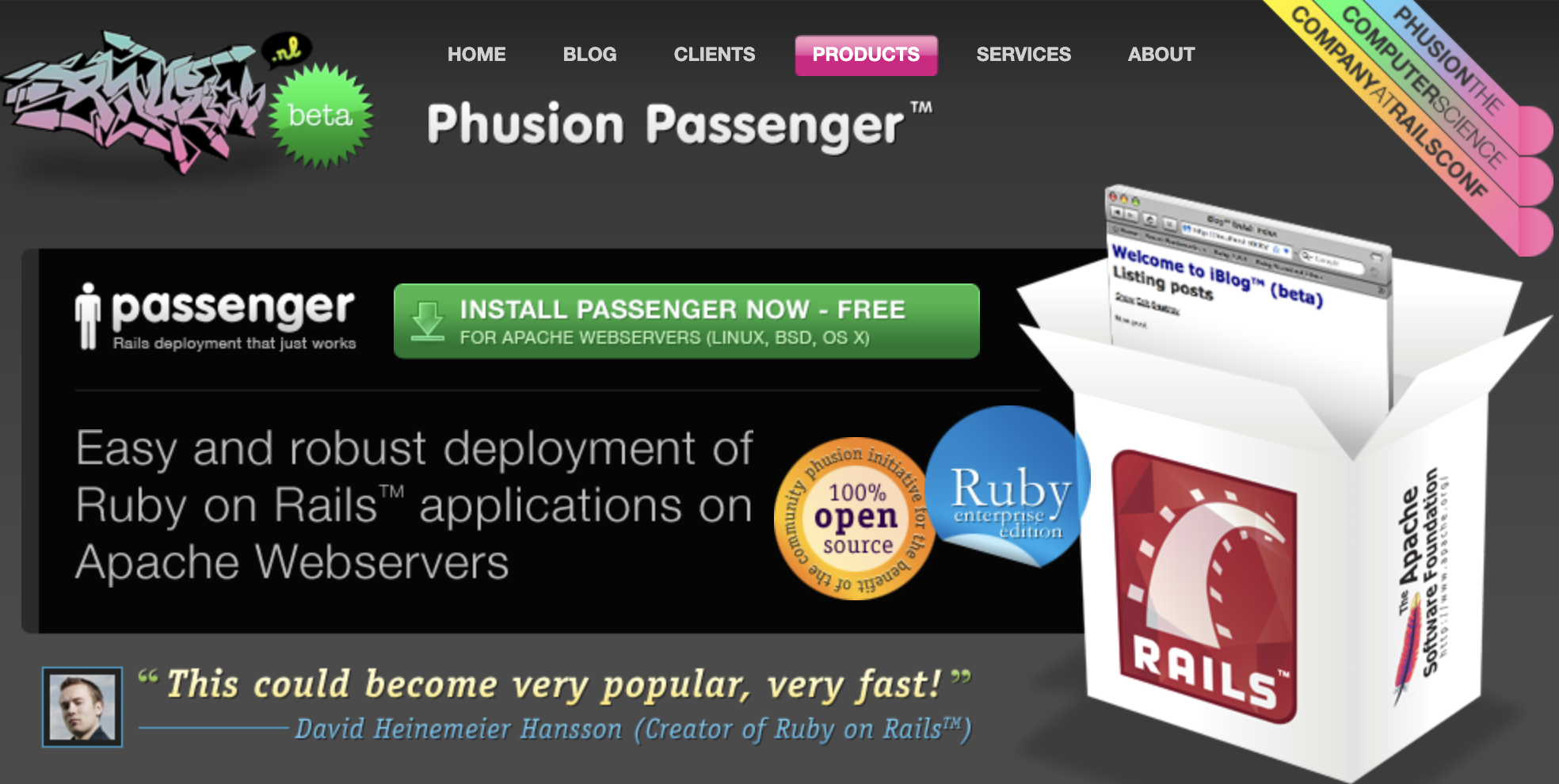
mod_rails) and Litespeed eventually helped by bringing a sort of PHP-like “just copy my code to a remote directory” method of deployment, but I still remember pushing stuff out with non-trivial Capistrano configs or hand-rolled Ansible playbooks to handle deployments, migrations and restarts. And then there were all the extra supporting components that would inevitably be required at each step along the way.
I had to include that old capture of the modrails.com site circa-2008 because a.) I really miss when websites had that kind of character, and b.) that is still a totally sick wildstyle logo 😄
This is why services like Heroku and Pivotal Cloud Foundry thrived back then - they offered a pain-free, albeit opinionated way to handle all this complexity. As the Pivotal haiku put it:
Here is my source code
Run it in the cloud for me
I do not care how.
You just did a git push or cf push, vague magic happened, and your code got turned into containers, linked to services and deployed.
These days I prefer to do the building of containers myself. Creating an OCI image as an artifact gives me flexibility over where things run and opens up all kinds of options. Today it might be a simple docker-compose stack on a single VPS, tomorrow it could be scaled out across a Kubernetes cluster via a Helm chart or operator. The container part is straight-foward as Rails creates a Dockerfile in each new application which is pretty much prod-ready. I usually tweak it slightly by adopting a “meta” container approach where I move some of the stuff that changes infrequently like installing gems, running apt-get and so on into an image that the main Dockerfile uses as a base.
You’re of course free to use any method you like to deploy that container, but Rails 8 makes Kamal the new default and it is an absolute joy to use.
I’ve seen some dissenting opinions on this, but bear in mind I’m coming from a place where I’m already building containers for everything anyway. I generally think this is “the way to go” these days and have the rest of the infra like CI/CD pipelines, container registries, monitoring and so on. Plus, given my background, I crank out VMs and cloud hosts with Terraform/Ansible “all day errday”. If you don’t have this stuff already or aren’t happy (or don’t have the time) to manage your own servers remember that Kamal is not a PaaS. It just gets you close to a self-hosted environment that functions very much like a PaaS. Now that Heroku is in a “sustaining engineering model” state, there are several options in the PaaS space you may want to investigate if that’s more up your street. I hear good things about fly.io but hasten to add I haven’t used it myself.
Your Kamal deployment configuration lives in a deploy.yml file where you define your servers by role: web frontends, background job workers and so on:
servers:
  web:
    - web.rails.example.com
  job:
    hosts:
      - jobs.rails.example.com
    cmd: bin/jobs
Or you can point everything to a single host and scale out later. These files can also inherit a base which makes splitting out the differences between environments simple. There’s also handy aliases defined which makes interacting with the containers easy, all that is required is a SSH connection to the remote hosts.
aliases:
  console: app exec --interactive --reuse "bin/rails console"
  shell: app exec --interactive --reuse "bash"
  logs: app logs -f
  dbc: app exec --interactive --reuse "bin/rails dbconsole --include-password"
When you deploy, Kamal will:
- Build the container, push it to the registry, and then pull it onto all servers
- Start a new container
- Route traffic to the new container once it passes health checks
- Stop the old container
- Perform clean-up by pruning old images and stopped containers
The routing bit is handled by kamal-proxy, a lightweight reverse proxy that sits in front of your application on each web server. When a new version deploys, kamal-proxy handles the zero-downtime switchover: It spins up the new container, health-checks it, then seamlessly cuts traffic over before stopping the old one. I front everything through Nginx (which is also where I do TLS termination) for consistency with the rest of my environment, but kamal-proxy doesn’t require any of that. It can handle your traffic directly and does SSL termination via Let’s Encrypt out of the box.
Secrets are handled sensibly too. Rather than committing credentials to your repo or fiddling with encrypted files, Kamal reads secrets from a .kamal/secrets file that simply points at other sources of secrets. These get injected as environment variables at deploy time, so you can safely handle your registry password, Rails master key, database credentials and so on. You can also pull secrets from external sources like 1Password or AWS SSM if you want something more sophisticated, and the sample file contains examples to get you going.
That’s a lot, but bear in mind it’s all driven by a single command: kamal deploy.
Here’s an Asciinema capture of a real-life manual deploy session including a look at what’s happening on my staging server in my homelab:
I have this triggered by GitLab CI pipelines, with protected branches for each of my environments. So usually, deployment happens after a simple git push or merge request being approved. The upshot is that it feels like that old Heroku magic again, except you own the whole stack and can see exactly what’s happening. A single kamal deploy builds, pushes and rolls out your changes across however many servers you’ve configured. It’s the kind of tooling Rails has needed for years.
Any Downsides ?

What I find appealing about the “magic” of Ruby might feel opaque and confusing to you. If you like expressive code and come from a Perl “There Is More Than One Way To Do It” background, I imagine you’ll love it. But I’ve come to realise that choice of tools (vi vs emacs vs vscode - FIGHT!) can be a very personal matter and often reflect far more of how our own minds work. Particularly so when it comes down to something like language and framework choice: These are the lowest layers that are responsible for turning your thoughts and ideas into executable code.
As a matter of taste, Ruby lines up more or less exactly with my sense of aesthetics about what a good system should be. But it is certainly an acquired taste, and that’s the biggest downside. Remember the survey results from the top of this article ? There’s no denying that Ruby and Rails’ appeal has become…. “more selective” over the years - to coin another phrase, this time from Spinal Tap.
It’s used in a lot of places that don’t make a lot of noise about it (some might surprise you), and there are still plenty of big established names like Shopify, Soundcloud and Basecamp running on Rails. Oh and GitHub, although I’m not sure we should shout about that anymore… But. While the Stack Overflow survey isn’t necessarily an accurate barometer of developer opinion, the positions of Ruby and Rails do show it’s fallen from grace in recent times. Anecdotally, I find a lot of documentation or guides that haven’t been updated for several years and the same goes for a lot of gems, plugins and other projects. Banners like this are becoming more and more common:

And I find that most gems follow a similar downward trend of activity. Take Devise for example. Plotting a graph of releases shows a pattern I see around a lot of Rails-adjacent projects. Big spikes or projects launched around the Rails “glory years” and then slowly trailing off into maintenance mode:
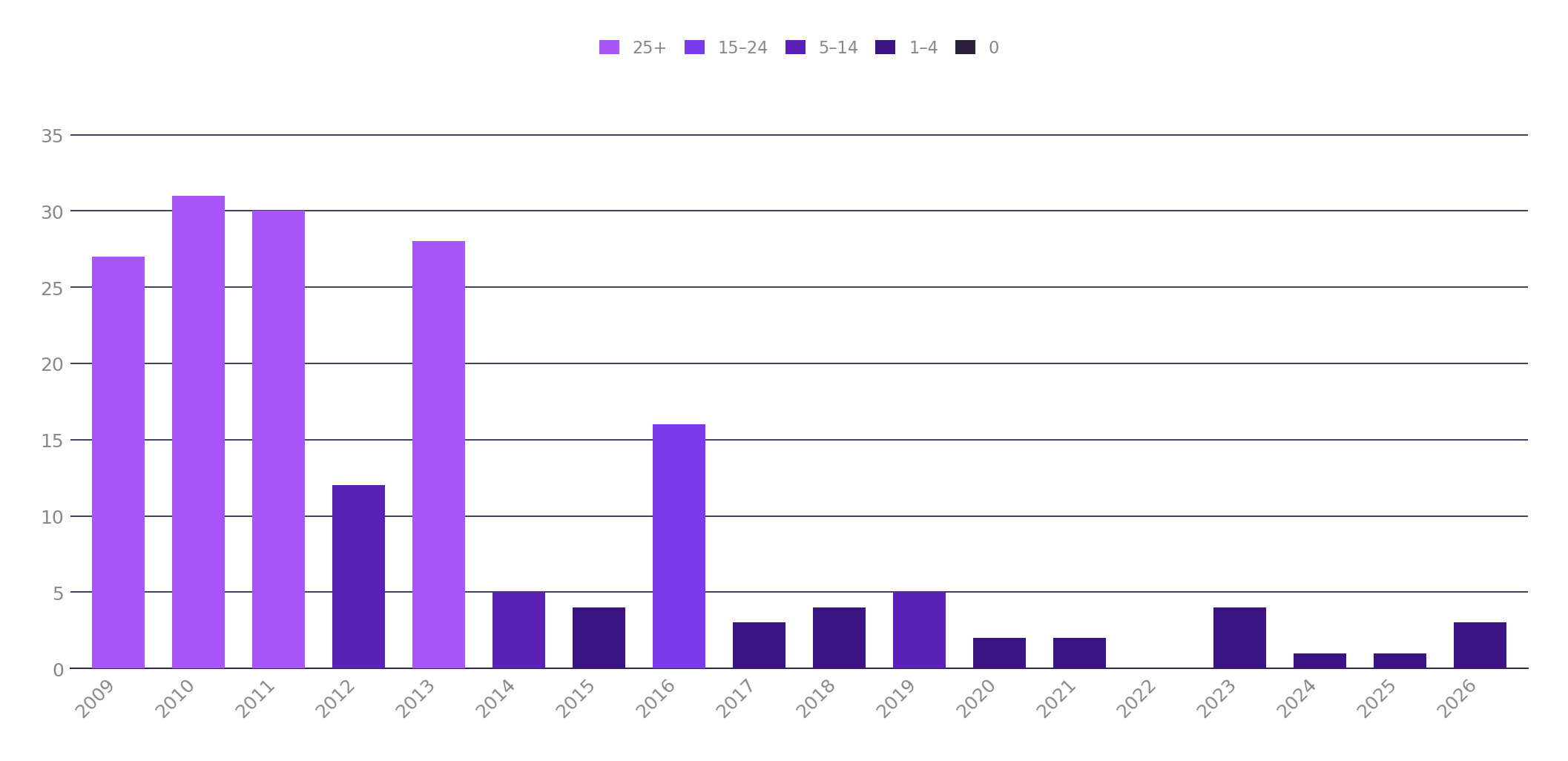
Apart from a spike in 2016 where it appears there was a bunch of activity around the v4 release, it’s been pretty quiet since then. The optimist might say that’s because by this point, most of these projects are simply “done”. These are really mature, reliable projects with around 2 decades of history running mission critical, high traffic websites. At what point are there simply no more features to add ?
But let’s look at the flipside. Rails on the other hand actually seems to be picking up steam and has been remarkably consistent since the big “boom” of Rails 3.0 in 2010:
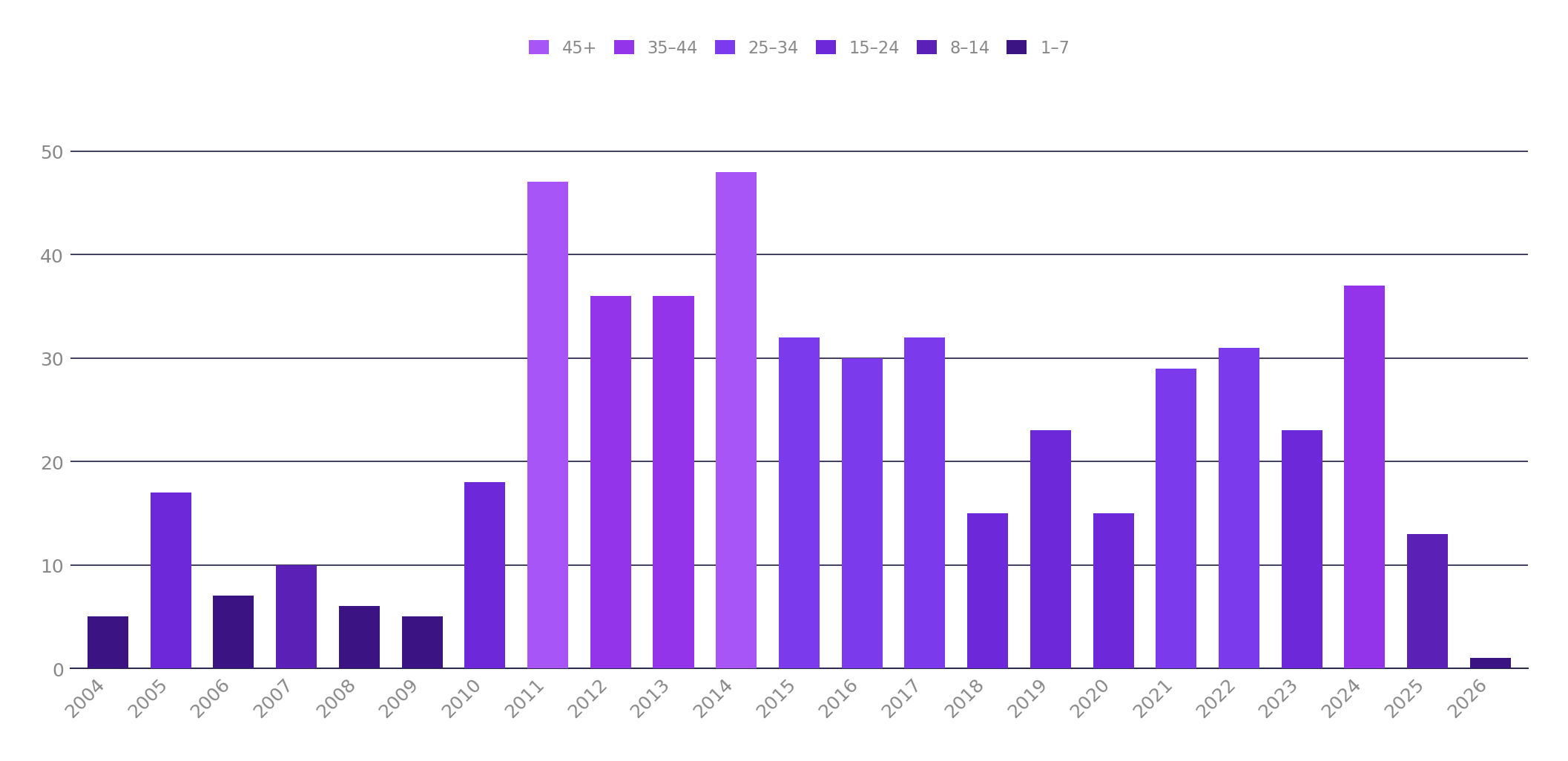
Despite the changing trends of the day, it’s consistently shipped releases every single year since it hit the bigtime. If anything, Rails is a rare example of an OSS project that’s grown into its release cadence rather than burning out. Whether it can still find an audience amongst new developers is an open question but I’m glad there are obviously a few more stubborn bastards like myself refusing to let go of what is clearly, for us, a very good thing. I probably could eventually build things almost as fast in another language or framework, but I doubt I’d be smiling as much while I did so.
Wrap-Up
If you’ve made it this far, congratulations and “thanks for coming to my TED talk” / protracted rant! I’m guessing something has piqued your curiosity, and if so, I highly recommend taking Rails out for a spin. Work through the tutorial, build something cool, and above all enjoy yourself while you’re at it - because at the end of the day, that’s what it’s all about. Sure, there are more popular frameworks that’ll make a bigger splash on your resume. But as I said at the start, sometimes it’s worth doing things just for the sheer hell of it.
Have Fun!
❤️
The opinions and views expressed on this website are my own and do not necessarily reflect the views of my employer, past or present.